If you're a clinical supervisor, one of your supervisees may ask you to sign their weekly supervision log through License Journey. This page explains exactly what that means, what you'll be asked to do, and what happens to your signature afterward. The whole process takes about two minutes and happens entirely in your web browser.
At a glance
- No account, password, or download. The secure link is all you need.
- Legally binding. A typed electronic signature is valid under the federal ESIGN Act and state UETA laws.
- You both keep a copy. The signed PDF is emailed to you and your supervisee the instant you finish.
What you received, and why
Your supervisee uses License Journey to track the clinical hours they accrue toward licensure (for example a California LCSW, LMFT, or LPCC, or a Washington LICSW or LASW). State boards require those hours to be verified by the supervising clinician.
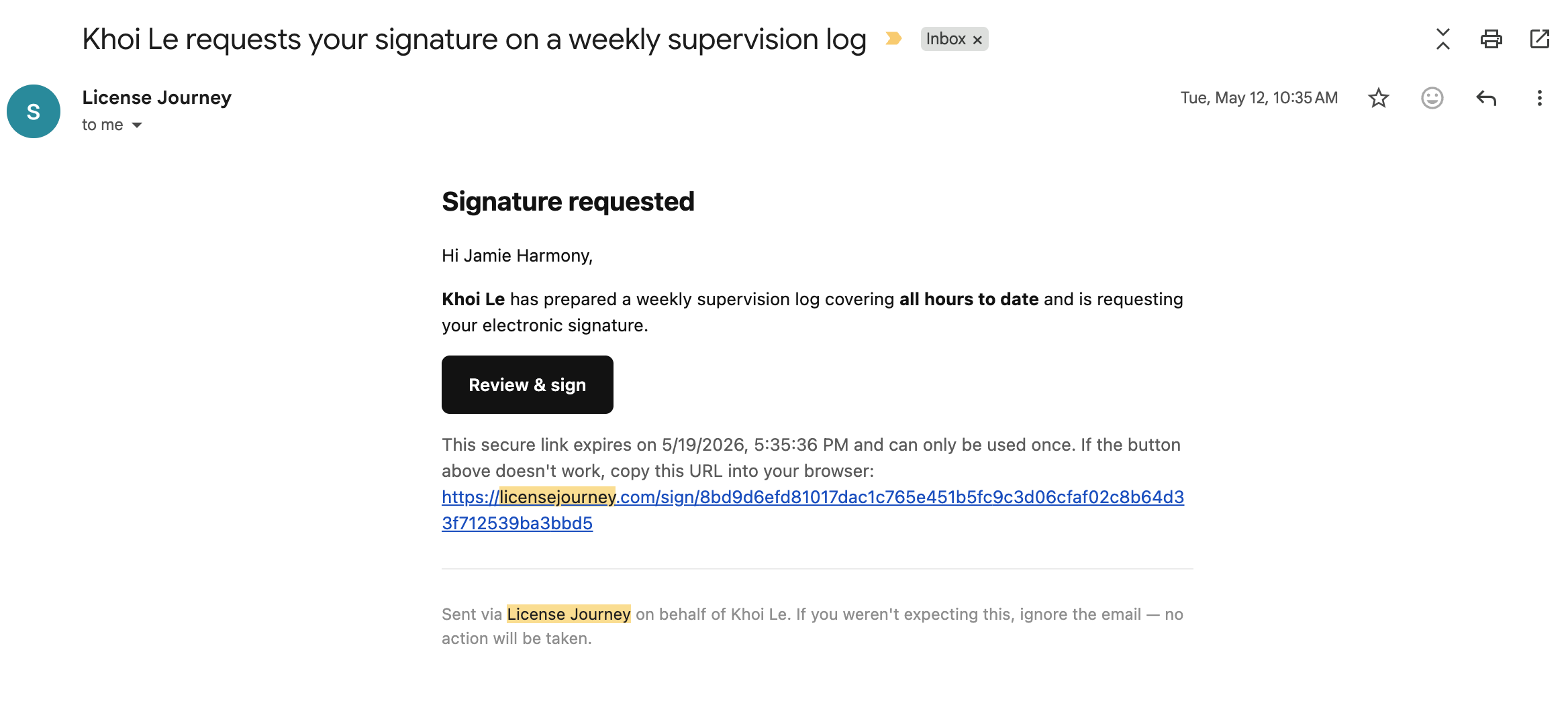
When your supervisee is ready for your sign-off, License Journey generates a weekly-log PDF that contains only the sessions you supervised and emails you a secure link to review and sign it. If a supervisee works with more than one supervisor, each supervisor receives their own separate log — you only ever see and attest to your own supervision.
The three steps to sign
Clicking the link in your email opens the signing page. At the very top you'll see who the log is for, the license type, the date range, and the total claimable hours — confirm those look right before you continue. Then there are three short steps.
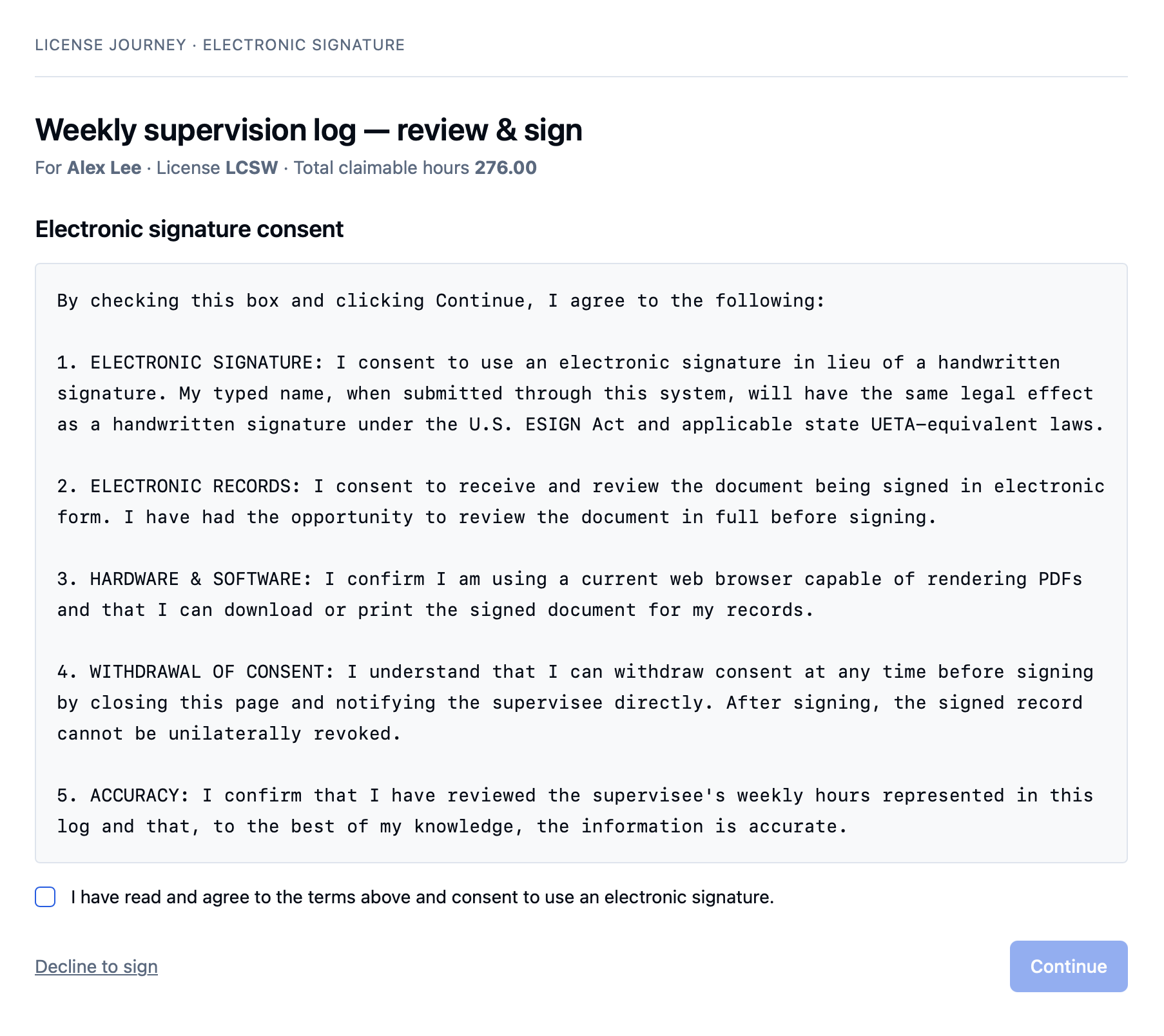
Step 1: Review and consent
You'll read a brief electronic-signature consent notice and tick a box to agree. This is the step that makes your signature legally valid — it confirms you agree to sign electronically and that you've had the chance to review the document in full.
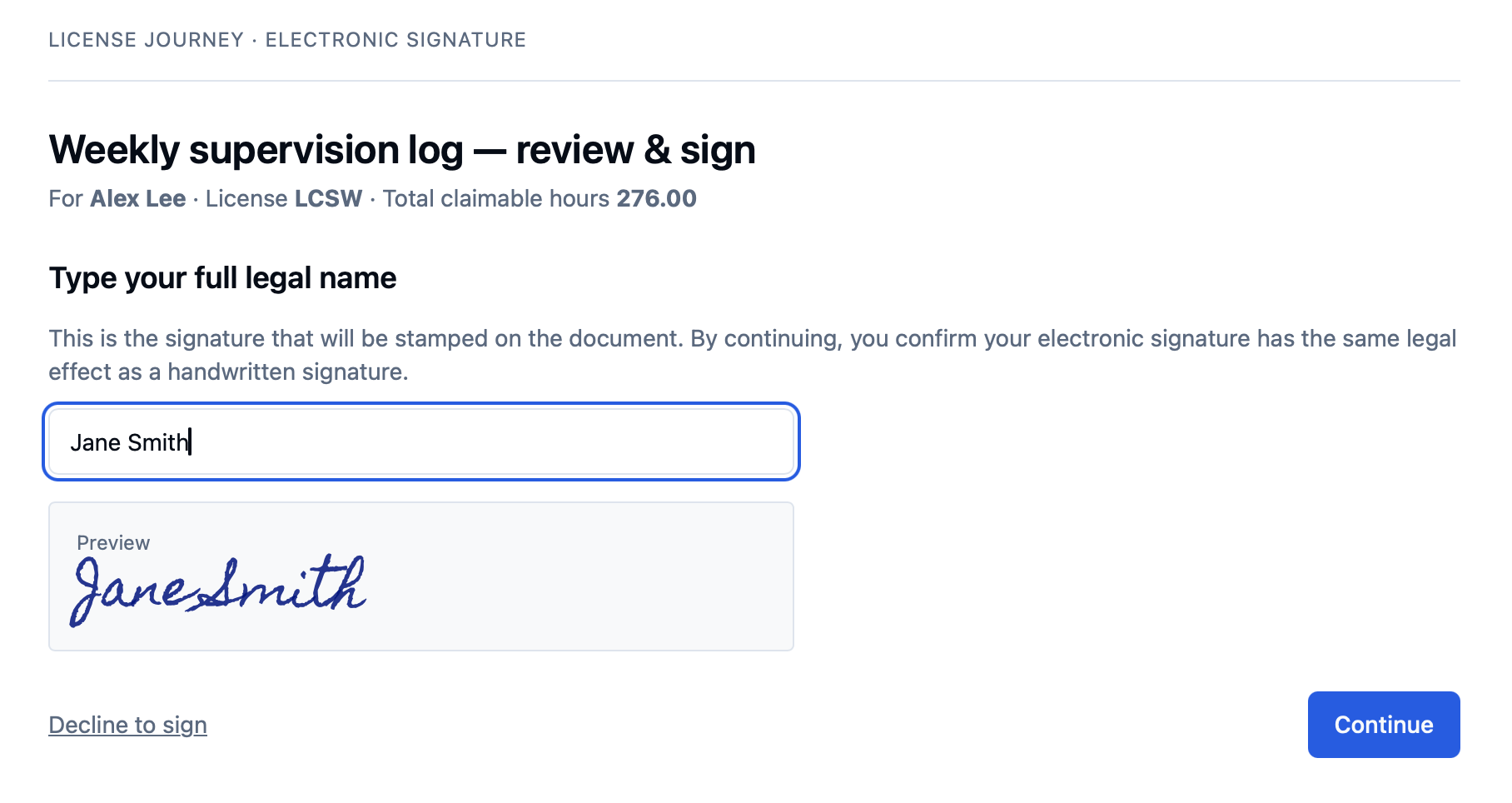
Step 2: Type your full legal name
Type your name exactly as you'd sign it. As you type, a live preview shows it rendered in a handwriting-style font — this is the signature that will be stamped onto the document.
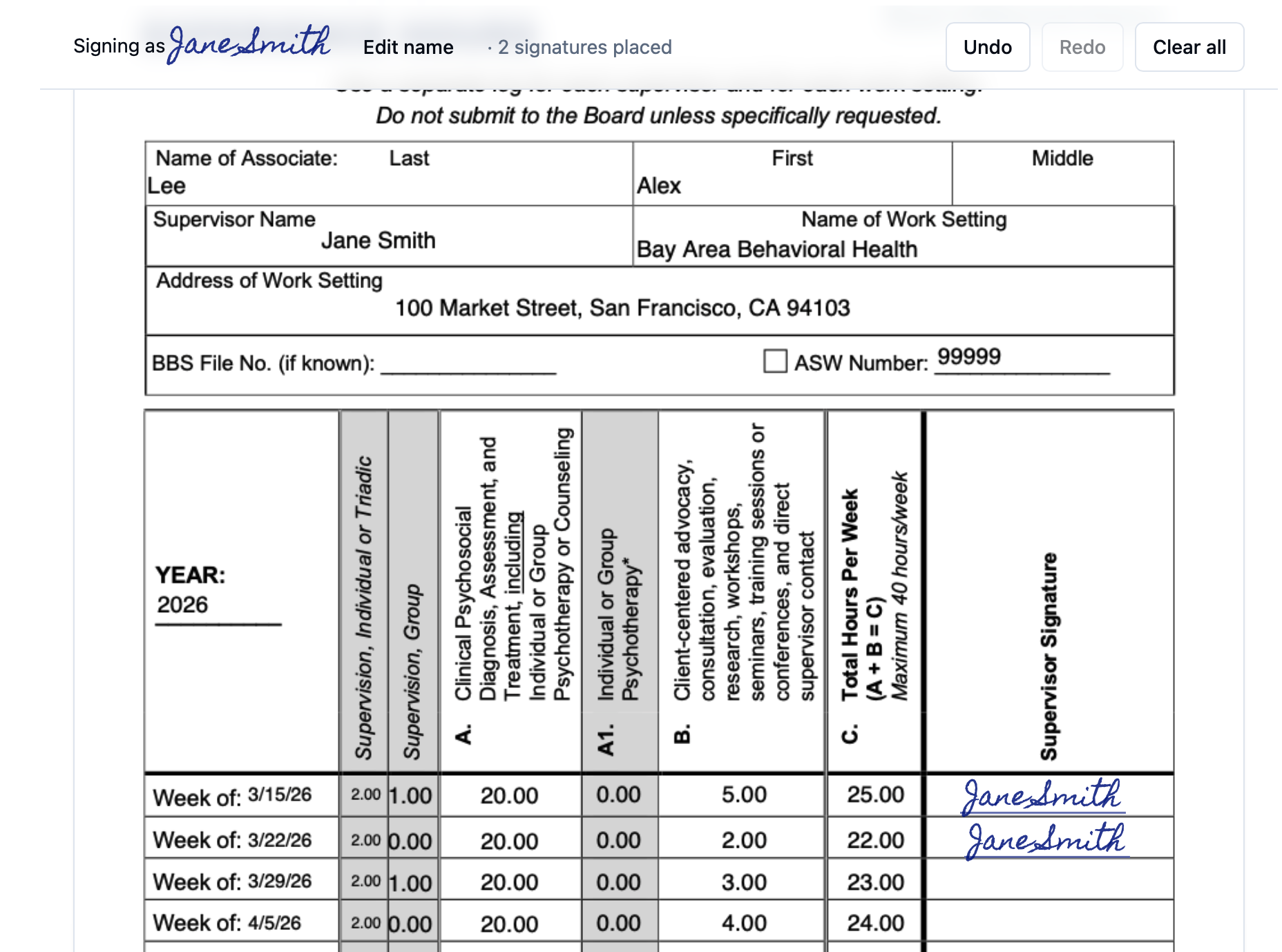
Step 3: Review and submit
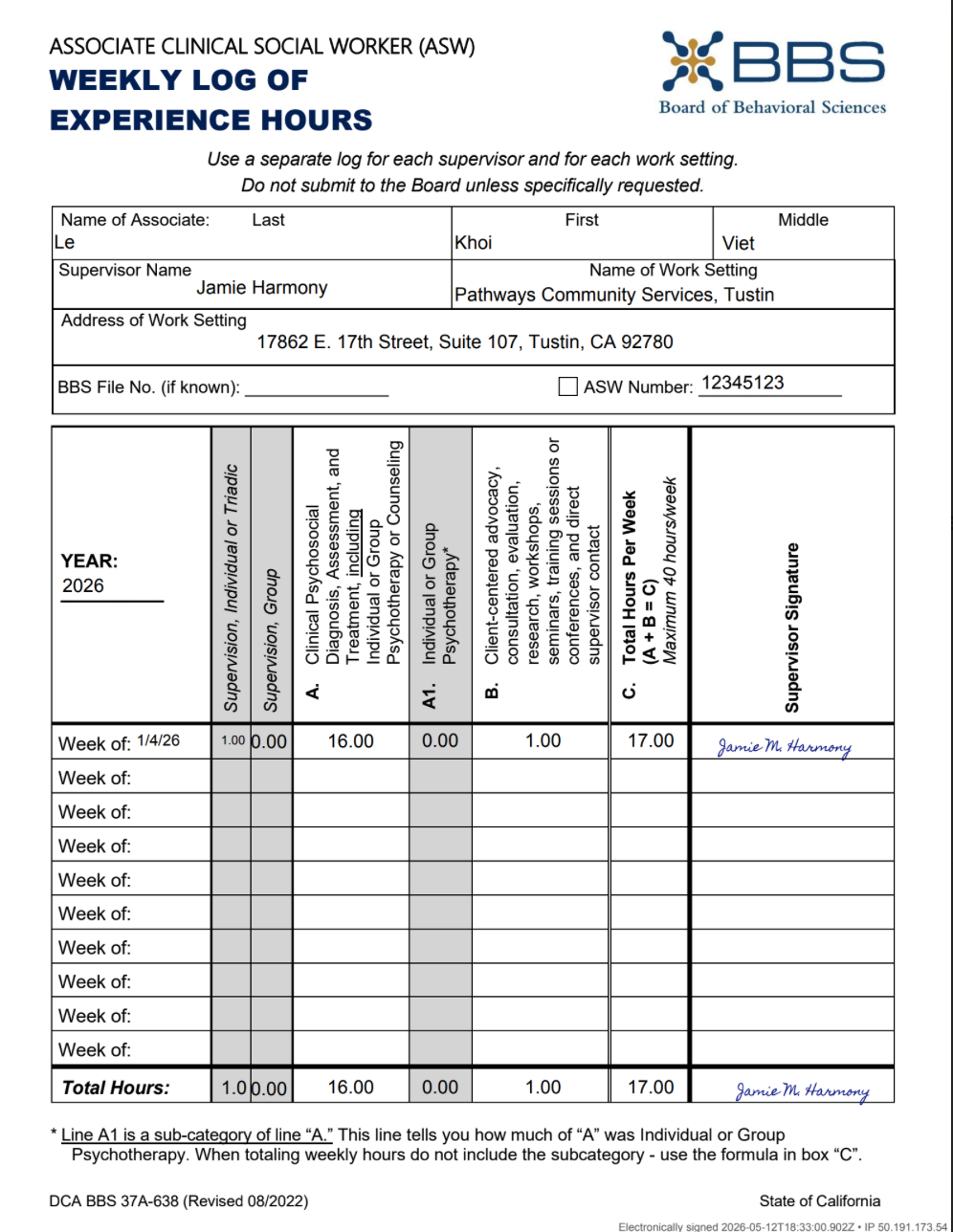
The full log is displayed page by page with your signature already on every week that has hours and on the totals row. Look it over. If something is wrong, Decline to sign with a note and your supervisee can fix it and resend. When everything looks right, choose Sign and submit.
What happens after you sign
As soon as you submit, License Journey stamps your signature onto every row and adds a small footer to each signed page noting the date, time, and IP address of the signing. It then emails the finished, signed PDF to both you and your supervisee, and the signed copy appears in your supervisee's account for their records and their board submission.
Is this legally valid?
Yes. Electronic signatures are recognized as legally binding by the federal ESIGN Act and by the Uniform Electronic Transactions Act (UETA) adopted by most states. When you type your name and submit it through this system, it carries the same legal effect as a handwritten signature.
Because you review and accept the consent notice before signing, and because the exact language you agreed to is saved with your signature, the record stands up to the kind of review a licensing board may apply.
How we keep it secure and tamper-evident
- A unique, single-use link. Your signing link is a long, random, one-time token that expires after seven days. There is no public listing of requests and nothing to guess.
- A full audit trail. We record when the link was opened, when you were shown and accepted the consent notice, each signature you placed, and the moment you submitted — each entry time-stamped and tied to the IP address and browser used.
- Tamper-evident fingerprints. We compute a SHA-256 fingerprint of both the original and the signed PDF. If a single byte of the document changes afterward, the fingerprint no longer matches — so alterations are detectable after the fact.
- Bound to the exact hours. Your signature applies to the specific version of the log you reviewed. If the underlying hours are later changed, that signed version is preserved as its own record rather than silently updated.
If something's wrong: declining and corrections
You should never sign a log you believe is inaccurate. At any step you can choose Decline to sign and add a short reason. Your supervisee is emailed your reason, can fix the log (correct an hour, recategorize a session, add a missed supervision unit), and send you a new request to sign the corrected version. If a link has already expired, just ask them to resend it.
What information we collect when you sign
To build the legal audit trail described above, we record the timestamps of each step, your IP address, your browser's user-agent, and the name you type as your signature. We use this solely to document the signing and to email both parties a copy of the result. For more, see our Privacy Policy.
Frequently asked questions
Do I need a License Journey account to sign?
No. The secure link your supervisee sent you is all you need. You do not create an account, set a password, or download any software — you review and sign right in your web browser.
Is an electronic signature legally valid?
Yes. Typed electronic signatures are legally binding under the federal ESIGN Act and state UETA-equivalent laws. Your typed name, submitted through this system, carries the same legal effect as a handwritten signature. You explicitly consent to sign electronically before you sign, and that consent is recorded.
What am I actually signing?
A weekly supervision log containing only the sessions you supervised for that supervisee. The license type, date range, and total claimable hours are shown at the top of the page before you sign, so you can confirm the numbers you are attesting to.
How long is the signing link valid?
Seven days. If the link expires before you sign, ask your supervisee to send a new request — it takes them a few seconds from inside the app.
What if the hours look wrong?
Do not sign a log you believe is inaccurate. Choose "Decline to sign" and add a short reason. Your supervisee is emailed your reason and can correct the log and send you a fresh request to sign.
Will I get a copy of what I signed?
Yes. The moment you submit, a copy of the finished, signed PDF is emailed automatically to both you and your supervisee. Keep it for your records.
I did not expect this email. How do I know it is legitimate?
Good instinct — always be cautious with unexpected links. A signing request is only ever generated when a specific supervisee you work with asks for your sign-off, and the link always points to licensejourney.com/sign/. If you are unsure, reply directly to the supervisee who sent it and confirm they requested your signature before you open it.
Can the document be altered after I sign it?
Tampering is detectable. We calculate a SHA-256 fingerprint of both the original and the signed PDF and store it in the audit trail, alongside the date, time, IP address, and browser used at each step. Any later change to the document no longer matches the recorded fingerprint.
For supervisors
There's nothing to set up. When a supervisee sends a request, just open the link in your email and follow the three steps above. Want to see the flow first? Explore the live demo.